Automation templates
A collection of Make.com AI automation templates accompanying the articles.
Each Make.com blueprint contains the complete Make.com module and scenario configuration and the full set of prompts used for the AI systems.
Steps to use the Make.com scenario blueprints:
Download the Github gist in the link and save it to your machine as a JSON file.
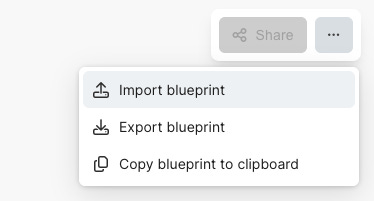
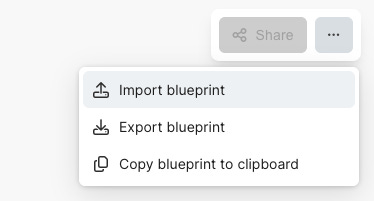
Import the blueprint in Make.com by clicking Import blueprint:
Set up connections & accounts, configure modules and you’re good to go!
Youtube RSS feed
Make.com automation that scrapes the RSS feed of Youtube channels, downloads the transcripts of the channels’ recently published videos, analyses them with AI to extract relevant insights, and stores everything in Notion.
You can download the Make.com template here.
Required configuration:
Google account
youtube-transcript.io (subscription, EUR 9.99/mo)
Gemini API key (paid)
Anthropic API key (paid)
Notion connection(s)
Substack RSS feed
Make.com automation that scrapes the RSS feed of selected Substack publications, analyses them with AI to extract relevant insights, and stores everything in Notion.
You can download the Make.com template here.
Required configuration:
Google account
Gemini API key (paid)
Anthropic API key (paid)
Notion connection(s)
Automated client fit assessments
Make.com automation to run automated client fit assessments on prospects.
You can download the Make.com template here.
Required configuration:
Tally form (free)
Webhook or Tally module (free)
Gemini API key (paid)
Notion connection(s) (free)
Anthropic API key (paid)
Gmail module (free)
Second brain, first attempt
An updated version of my voice-first second brain.
Feel free to curate and edit it any way you want—mine is also continuously evolving!
You can download the Make.com automation template here.
Required configuration in Make.com:
Webhook (Voicenotes.com or other voice recording tool) free / paid
Gemini API key (paid)
Anthropic API key (paid)
Notion connection(s) (free)
(Optionally) Typefully account (paid)
Newsletter automation
This is an old automation I no longer use but can be really helpful to quickly get to a first draft of your newsletter. After taking up one-on-one coaching with Tim Denning in March 2025 I’ve reverted back to a 100% human-authored newsletter, and only use AI writing for news summaries.
You can download the Make.com scenario I used to use to draft my newsletter here.
Create a new scenario in Make.com, and import the blueprint to get started!
Required configuration in Make.com:
Google account (free)
Gemini API key (paid)
Anthropic API key (paid)