
How I track YouTube trends without watching videos
Building a daily Youtube digest with AI automation

In order to bring my youtube channel back from the dead (🧟♂️) I decided to need to understand what the kids on Youtube are talking about these days.
Youtube has changed a lot since I was last working on my channel 12 months ago.
After reactivating my VidIQ subscription, I found that even though their outlier screening tool is useful to see what kind of video formats are performing well, it doesn’t tell me much about content trends.
And trend hacking is still one of the fastest ways to grow a small channel.
This can be seen from my best performing video, which racked up 94k views so far:
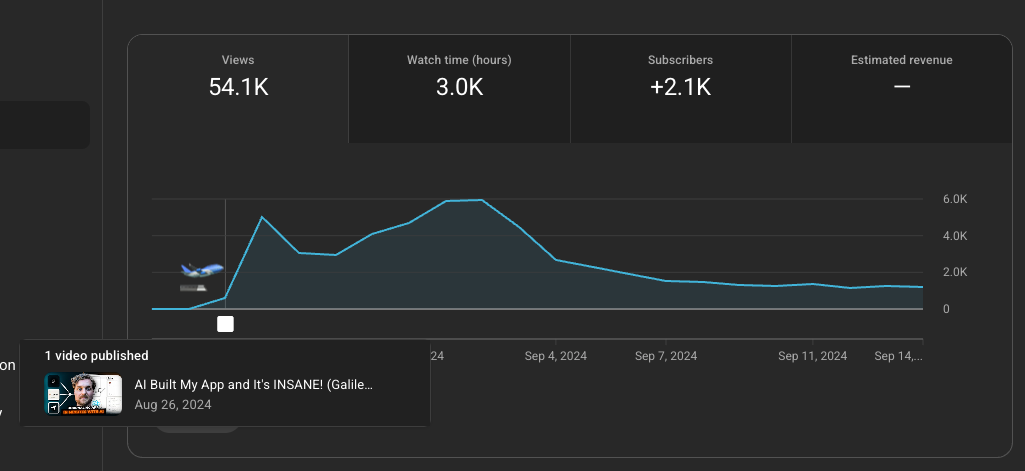
In the video I walked through my AI coding workflow with Cursor.
It did incredibly well, pushing my channel from 2 to 6000 views per day!
This was before the term “vibe coding” was even coined, and I got really lucky with the timing—a couple of days after publishing the video, discussions around Cursor happened to blow up on X. This probably really helped drive interest in the topic.
Funny thing—I actually thought I was a couple of weeks late publishing the video! 🤷🏼♂️
Anyhow, in order to track trends on Youtube I decided to build a Make.com (affiliate link) automation that listens to RSS feeds from Youtube channels I find interesting, downloads and processes the video transcripts, and then proceeds to analyze the transcripts for topics, tools and technological breakthroughs discussed in them.
The Make.com scenario integrates with a similar Make.com automation I built a couple of weeks ago to track articles published by Substack newsletters:

Here’s the diagram of the Make.com “Youtube RSS feed” scenario:
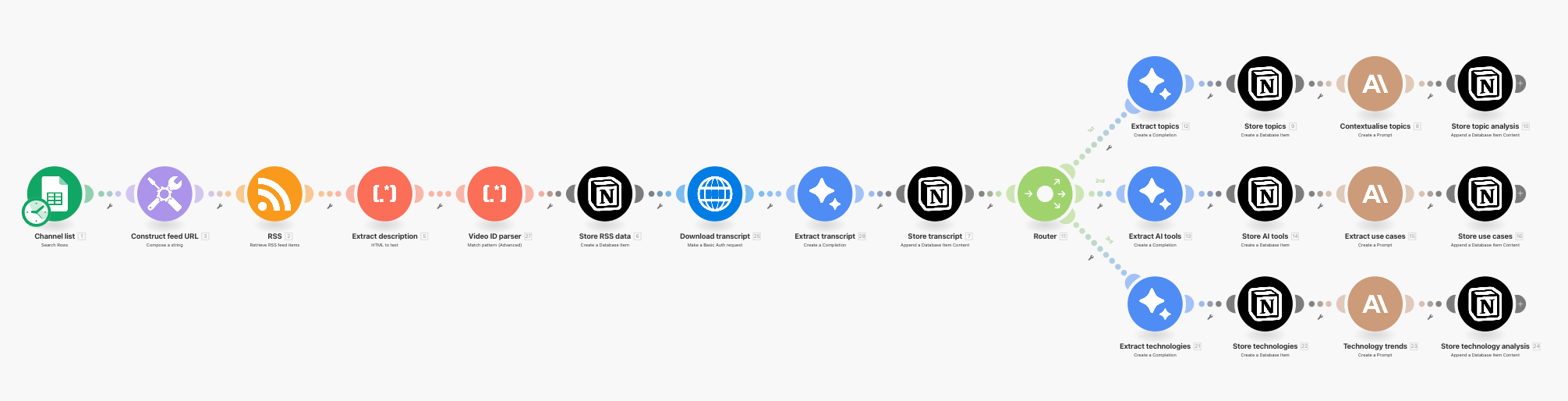
Let’s walk through the automation step by step.
Monitoring Youtube channel RSS feeds
The Make.com workflow starts with a Google Sheets module that contains a curated list of YouTube channels I want to monitor.
Each channel has an RSS feed in the format “https://www.youtube.com/feeds/videos.xml?channel_id=<CHANNEL_ID>”, so if I want to tap into their feeds I need the channel ID (here’s an example Youtube channel feed, this one is from my zombie channel).
These channel IDs aren’t easy to retrieve, but youtube-transcript.io has a helpful widget that lets you look up channel IDs based on channel URLs.
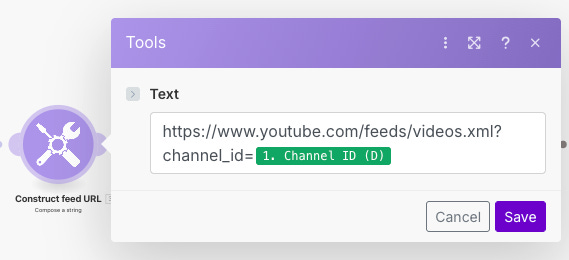
Now that I’m tapped in, I can start monitoring their feeds—channel RSS feeds update automatically whenever a Youtube channel publishes new content.
Since I am scheduling the the Make.com scenario to run daily, the automation needs to check for Youtube videos uploaded to the channel during the last 24 hours:
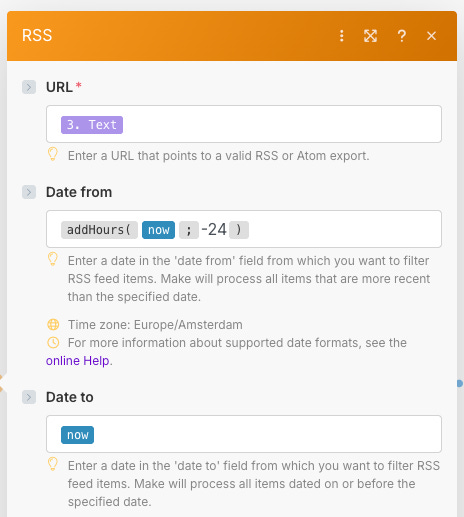
The video metadata from the RSS feed—title, description, publish date, channel, video URL, views and likes—will be stored in a Notion database.
Getting the Youtube video transcripts
Most of the work setting up this automation went into getting the video transcripts.
Unlike the Substack RSS feed which contains the full article content for most articles published on Substack, Youtube channel RSS feeds don’t contain video transcripts.
After some research with Google Gemini I decided to go with a paid solution, youtube-transcript.io. It costs EUR 10/mo for the “lite” plan I’m on, which includes 1000 video transcript downloads per month.
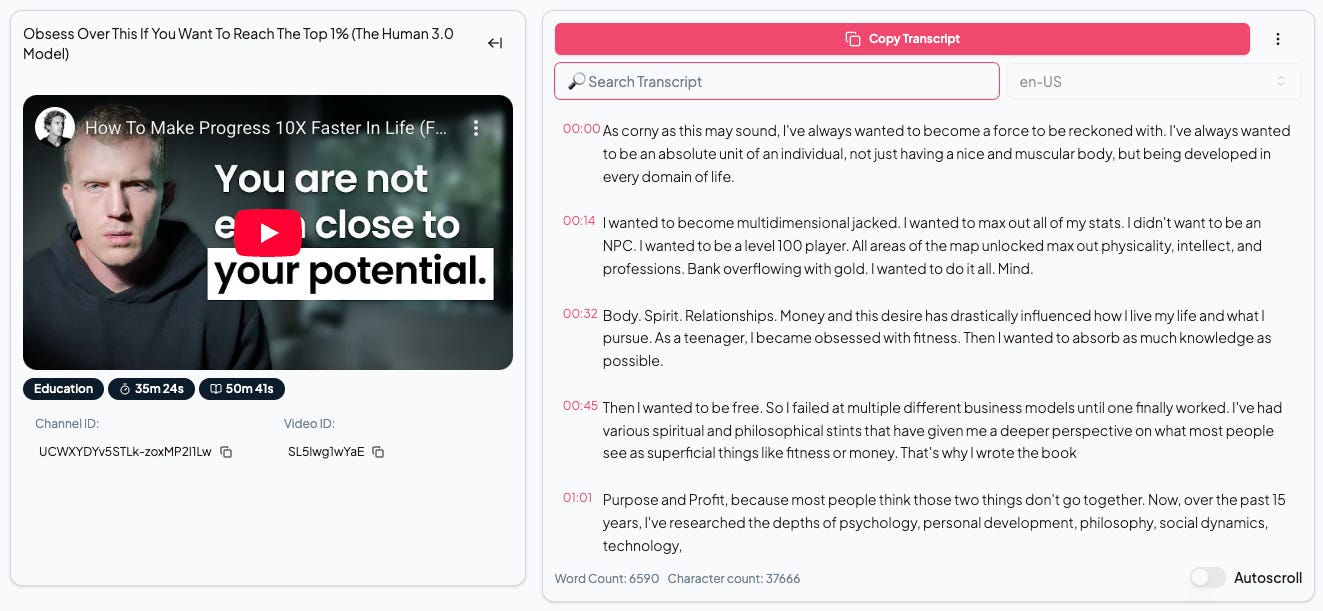
While it’s not hard to build a similar tool yourself, I decided to not do so until I get enough value from this automation to want to scale it to more channels. Getting a yt.io paid subscription meant I could set up this entire Youtube RSS feed automation in roughly 90 minutes, rather than spending hours building the agentic AI scraping tool, setting up infrastructure for it, and then having to fix it when things go wrong.
The choice is yours of course.
Youtube-transcript.io doesn’t have an official Make.com module, but they have a handy template for configuring the Make.com HTTP module.
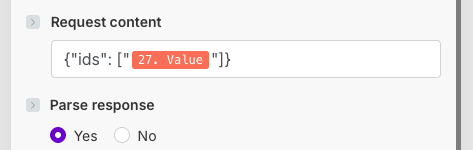
After getting the transcription data from yt.io, it needs to be formatted for readability.
For formatting I’m using a Google Gemini 2.5 Flash completion:
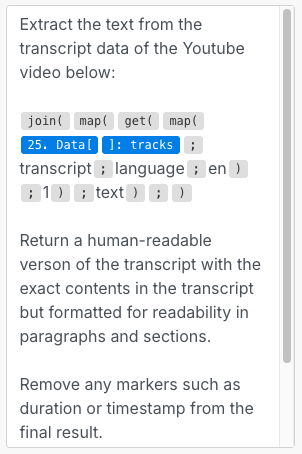
The output of this Gemini 2.5 Flash completion is the video transcript stored to Notion and used by all the downstream Make.com modules in the automation.
Putting everything together
The content intelligence and topic extraction prompts are exactly the same as for my Substack RSS feed, so I won’t discuss them here—you can find them in this article.
As before, I’m doing the analyses in Claude Code since I want to be flexible in what I look at from week to week, depending on the article I’m writing.
The one change I made to my local setup was to have Claude Code break up the content intelligence Python scripts by source—topic analyses will now run for both individual sources (Substack and Youtube) and for all sources in a combined analysis.


The Substack and Youtube RSS feed automations are scheduled to run in Make.com every morning, giving me the option to do a daily roundup of the most important topics and themes discussed in the last 24 hours in Notion.
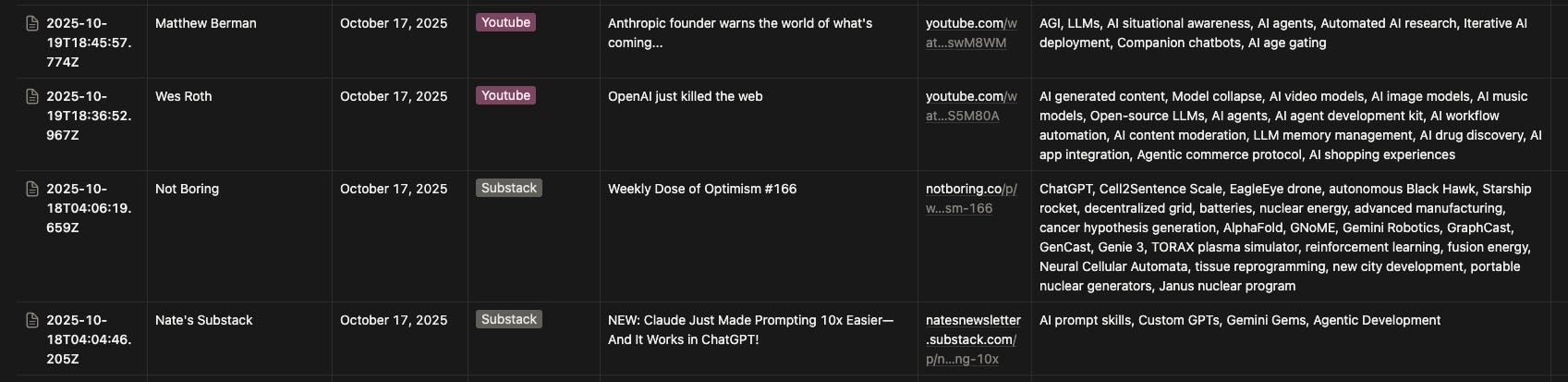
This daily digest can be curated in ways a feed algorithm would never allow you to.
The biggest blind spot in this setup is that the entire flow of information is biased towards topics, content, publications and channels that I’m already interested in.
Then again, it saves me a ton of time watching videos and reading articles—allowing me to spend my time reading or watching content more selectively and strategically.
Last week in AI
Anthropic launched Claude Skills—a new framework that lets you build custom “skills” to teach Claude specialized tasks. Skills are portable folders containing instructions, scripts, and resources that work across Claude.ai, API, and Claude Code. What’s particularly clever about the implementation is progressive disclosure: Claude automatically scans available skills and loads only the minimal information needed for each task, keeping responses fast while accessing specialized expertise. The framework ships with pre-built skills for Excel spreadsheets, PowerPoint presentations, Word documents, and fillable PDFs—available now for Pro, Max, Team, and Enterprise users. Unrelated, they also released Claude Haiku 4.5, delivering similar coding performance to Claude Sonnet 4 at one-third the cost and more than twice the speed.
Google dropped Veo 3.1, bringing richer audio, enhanced narrative control, and improved realism. The update added audio capabilities to existing features like “Ingredients to Video” and “Frames to Video” in Google Flow, and by the announcement date, over 275 million videos had been generated in Flow.
OpenAI and Broadcom announced a strategic collaboration to deploy 10 gigawatts of OpenAI-designed AI accelerators in a multi-year partnership. OpenAI will design custom accelerators and systems, developed and deployed with Broadcom, starting in 2026 through 2029.
Apple unleashed M5, delivering the next big leap in AI performance for Apple silicon. The new chip features a next-generation GPU with Neural Accelerators in each core, delivering up to 3.5x the AI performance and 4x the peak GPU compute performance for AI compared to M4. Pre-orders opened October 15, with availability beginning October 22.
Very cool! I have a similar automation for a few YouTube channels I follow to get post ideas. Well done
I love how you structure and scaffold everything on such a solid, well-engineered foundation.
will apply it and keep you post it :)