
AI just made workflow automation 20x cheaper. Now what?
The shift from static automation to fluid, modular systems

2024 was all about AI automation.
2025 was the year of AI agents.
2026 will be the year of AI operations.
AI coding is now pretty much solved.
Recent AI model and tooling advances have made it possible for software engineers to never have to write a line of code manually ever again.
This means that the unrealized gains in workflow automation outcomes—which all software engineering eventually is—have definitively shifted from execution to systems design.
In keeping, my approach to AI automation has changed a lot these past 12 months.
When I wrote the AI Automation Playbook back in March of 2025, the sunk costs of developing workflow automations were still pretty high.
You had to think carefully about ROI before building anything.
Today, tools like Claude Code with Opus 4.5 have made automation 20x cheaper.
A good example is my LinkedIn content system.
It took me 2 hours to set up, with Claude Code generating a handful of custom MCP servers tailored specifically to my workflows and content schedule.
The same thing would have taken me 3-4 days to set up back in 2024.
So what does this mean for you? How should you approach workflow design in 2026?
From static to fluid workflows
Perhaps the biggest shift is that most automated workflows will no longer be “fire and forget”—build once, run forever.
That’s just not how AI works anymore.
AI capabilities are progressing rapidly along what researchers call a “jagged frontier” —improving unevenly across different tasks with each model release.
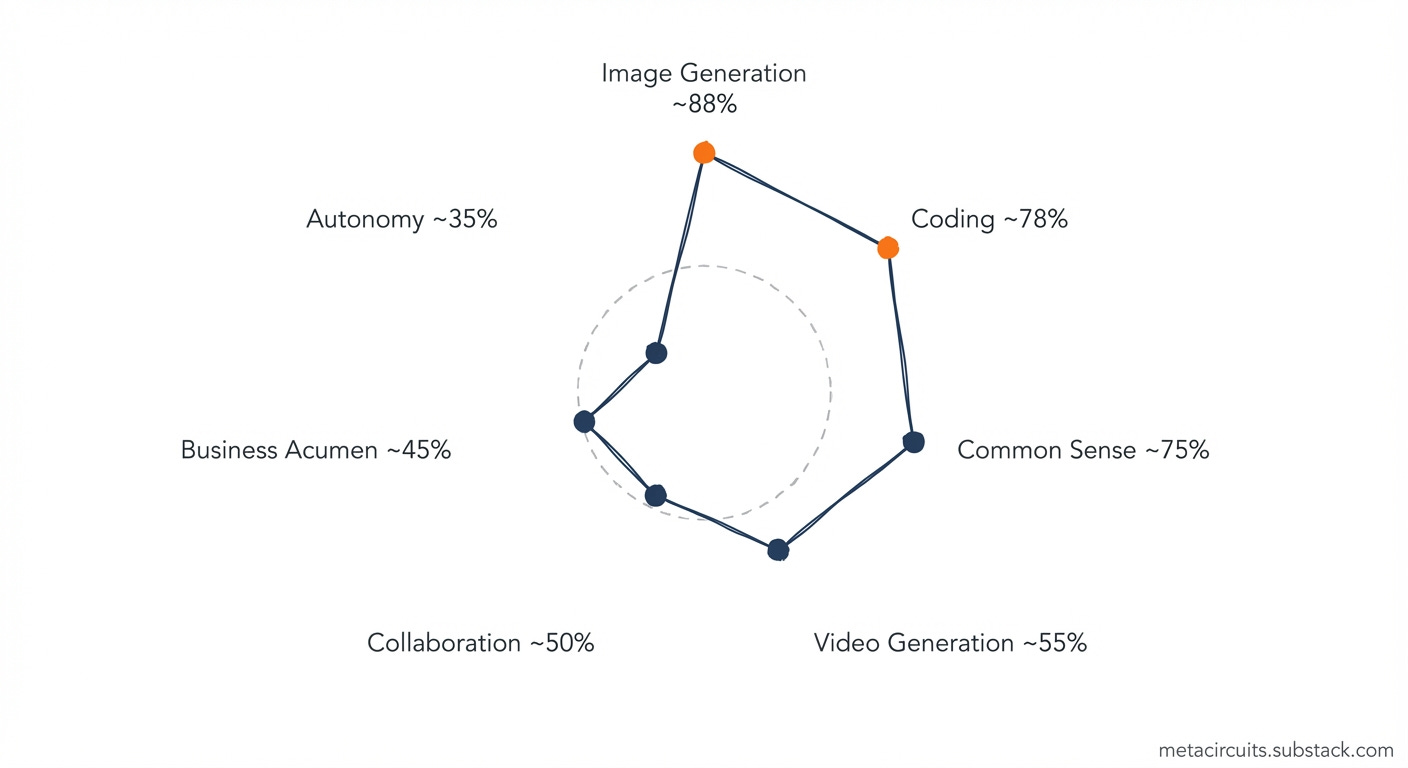
What an AI system couldn’t do yesterday, it might well be able to do tomorrow.
In this dynamic environment, having workflows that are modular so that you can update parts without throwing away the entire system is the way to go.
It also means that you will need to update workflows much more frequently—if you aren’t already doing so.
In other words, you need to start treating your automation workflows as living organisms rather than as fixed pipelines.
This requires a different kind of tool—one that can evolve with you.
To help me navigate this new reality I’ve become increasingly dependent on Claude Code (CC) as my AI command center.
Right now the structure I am using is project workspace = CC config + directory tree.
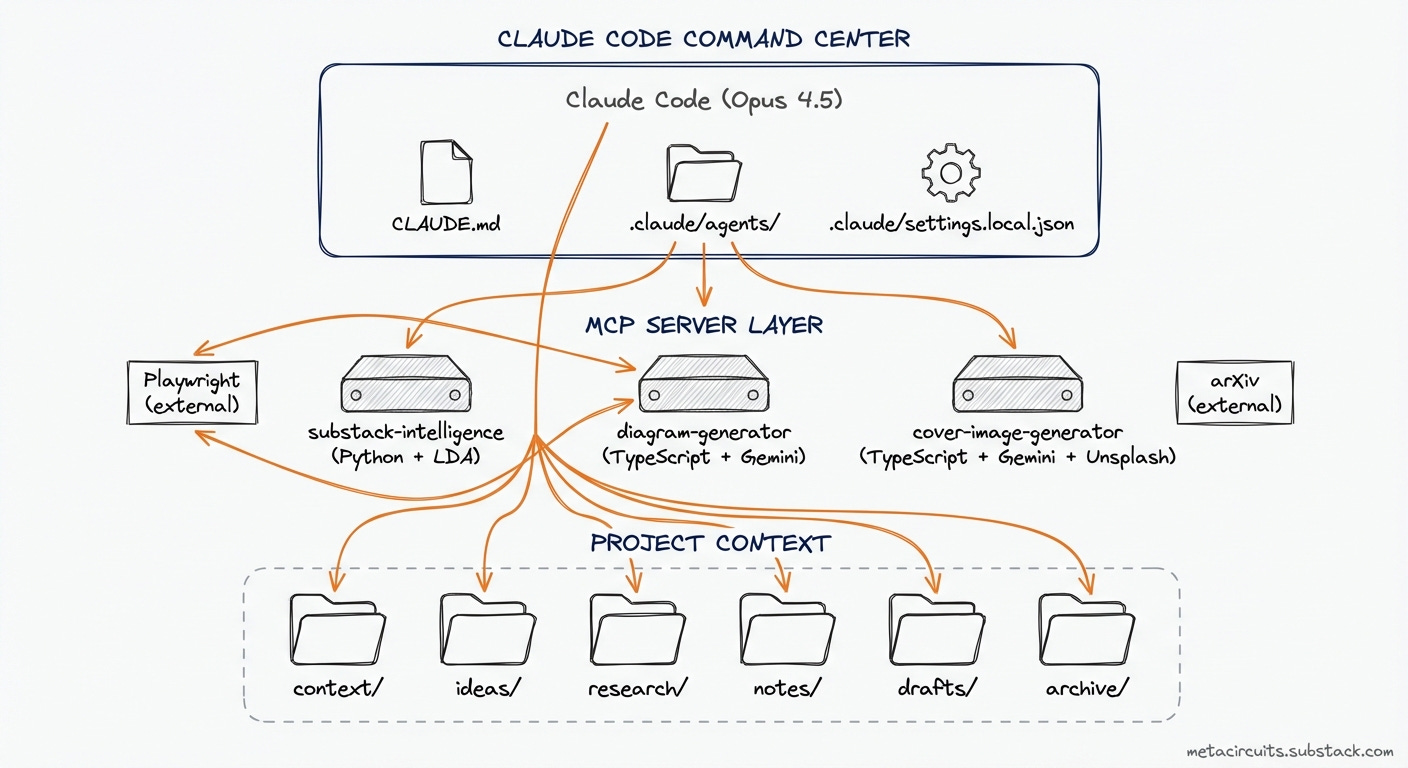
Each CC project directory contains all the necessary context for the AI model to function properly in file format.
The benefit of using a file system-based command center like CC is that you can empower your project work with custom MCP (Model Context Protocol) servers—specialized tools that extend Claude’s capabilities for specific tasks.
Of course these custom MCP servers are written exclusively by Claude 4.5 Opus.
Breaking up your workflows into modular sub-systems
Why use custom MCP servers?
They let you keep the fixed, complex parts of workflows stable by encoding them in custom N=1 software programs. These MCP servers run the parts of workflows that take the most time to refine—complex subtasks for which it makes sense to spend some time designing outcomes.
The alternative is having to explain what you want to a random AI system each time you want something done, risking inconsistent results and lots of frustrating back-and-forth with the AI system.
This way of working has also pushed me to prefer to use AI tools that can be called programmatically, either through APIs (Application Programming Interfaces), third-party MCP servers like Playwright, or via emerging agent-to-agent interoperability protocols like A2A (Agent-to-Agent) or ACP (Agentic Commerce Protocol).
This modular design allows you to easily swap out or upgrade subsystems based on new insights, workflows, or AI product or model releases. And what is more, they allow you to run multiple workflows with the same modular subsystem.
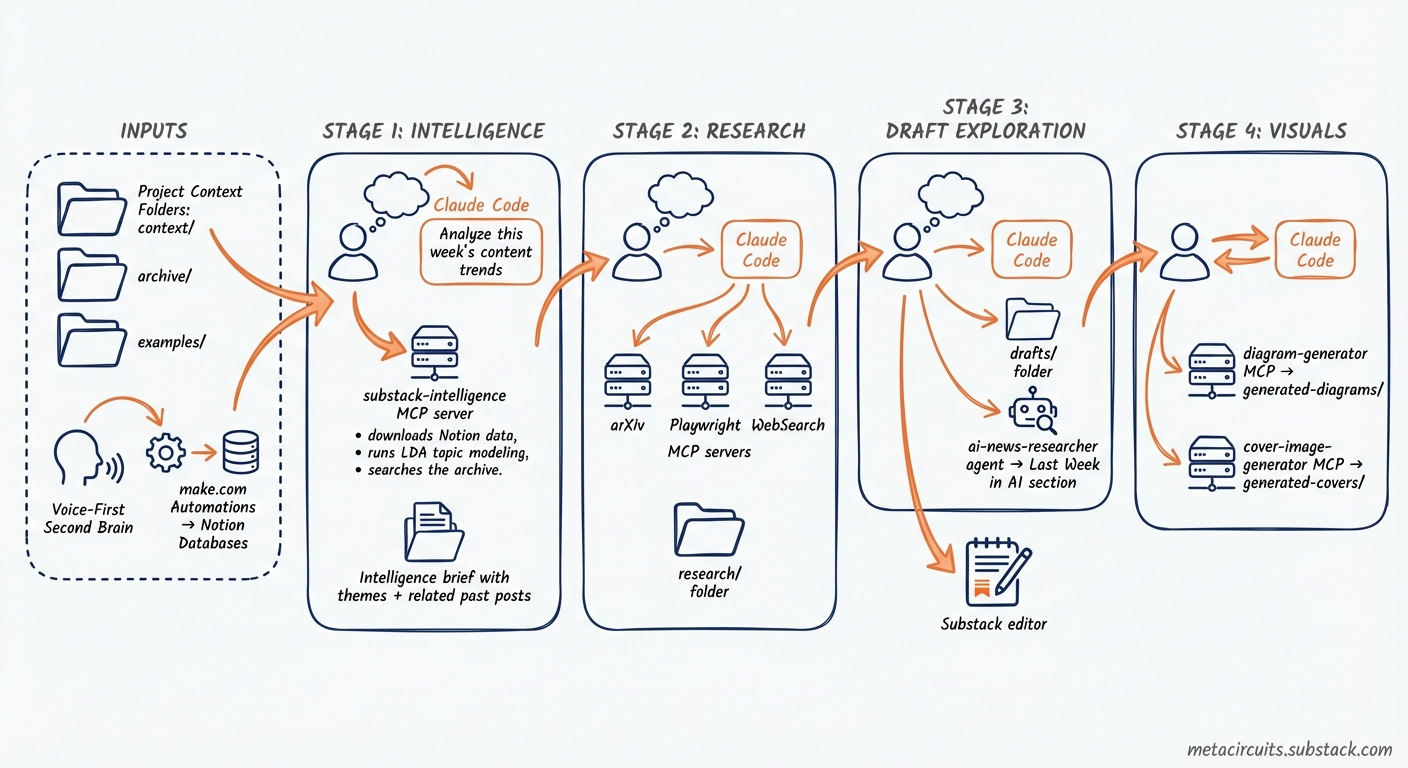
And when I need to upgrade a subsystem—for example, when a new image generation model comes along and I want to switch from Nano Banana Pro to this new model—all I need to do is ask Claude in CC to update the designated MCP server subsystem.
No manual intervention required.
Whereas when I would need to make this change in a workflow automation tool like make.com or n8n, it would require a lot of clicking, copy and pasting, and testing.
By delegating the execution of the system changes to Claude, I can focus on fine-tuning the performance of the modular subsystems. This saves me a lot of time.
Trust, but verify
One other thing that a fluid, modular workflow design helps with: it lets you supervise and intercept AI model execution and output as needed.
For me, the ideal is no longer to have AI run my life in the background while I focus on other things. I want to work with AI to get things done.
In fact, AI running my life in the background sounds like a really bad idea.
So the mantra I’ve come to adopt is trust, but verify.
I’ve found this to be the best way to address the verification gap that currently separates AI power users from the uninitiated.
Once you have a more stable workflow, it will also become possible to design a trust architecture based on your learnings and insights.
This can be as simple as iteratively adding and updating AI system guidelines and AI model instructions in your projects.
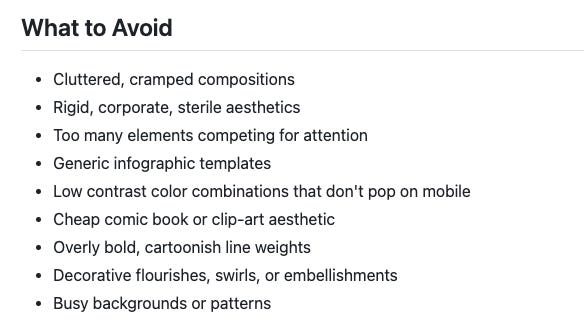
And once you’ve broken down workflows into discrete subsystems, you can insert verification checkpoints wherever they make sense to you—without having to rely on AI model providers or software vendors to build them in and hope they work.
As Boris Cherny—the creator of Claude Code—wrote 10 days ago:

The architect mindset
This shift from workflow execution to workflow design requires a mindset change.
AI agents are transitioning from assistive tools to operational execution engines.
What does this mean for you?
It means that if you’re still thinking of AI as a tool that helps you do tasks faster, you’re thinking too small.
The new paradigm is AI as execution layer, humans as architects.
You set the strategic direction.
You define the acceptance criteria.
You verify the outcomes.
You build the guardrails.
AI does the work.
And increasingly you can have AI review AI output before you ever see it.
Agents handle generation and first-pass review while you architect the guardrails.
If you want to help your organization get ahead in 2026, I highly recommend getting hands-on defining architectural strategy, creating workflows, identifying subsystems, and scaling AI operations.
You don’t need the title to adopt the mindset.
Designing the AI execution layer
As we said at the beginning, 2026 will be the year of AI operations.
But AI operators won’t be able to do anything without a proper AI workspace.
So make sure your AI architecture checks all of the boxes below.
Design for fluidity, not permanence. Your workflows will need to evolve as AI capabilities improve and better trust infrastructure is built.
Build verification infrastructure before scaling. Trust is the bottleneck.
Adopt the architect mindset. Our job is to set direction and build guardrails—not review each generated piece of AI output.
Recalibrate your expectations. What was expensive to build in 2025 is cheap in 2026. More workflows are worth automating now.
The people who figure this out first will capture outsized productivity gains.
Research shows AI-assisted professionals complete tasks 25-56% faster, with an average of 3.5 hours saved per week.
That’s 180 hours a year. Almost a month of working time.
What would you do with an extra month?
If you want to redesign your workflows with AI, I can help:
For teams: I run 3-hour hands-on workflow redesign workshops where we map current workflows, identify bottlenecks, and design AI-powered improvements together. Your team walks away with automation templates and production-ready AI agent designs.
For individuals: AI Operators is my 4-week 1-on-1 coaching program that helps you build your personal AI Operating System—so you can automate repetitive tasks and focus on work that matters.
And if you want to learn more about the topic of this post, I’m holding a live session on my CC setup this Thursday 5 PM CET in the Cozora creator community—paid subscribers to The Circuit get up to 50% off Cozora memberships, so be sure to register for The Circuit!
Last week in AI
CES 2026 was all about physical AI and infrastructure. NVIDIA stole the show with the Rubin platform—a six-chip AI supercomputer that Jensen Huang says delivers “AI tokens at one-tenth the cost” compared to Blackwell. The numbers are staggering: 10x reduction in inference costs, 4x reduction in GPUs needed to train MoE models, and it’s already in full production six months ahead of schedule. Alongside Rubin, NVIDIA unveiled six domain-specific open models including Clara for healthcare, Cosmos for robotics, and Alpamayo—the first open vision-language-action model for autonomous driving.
On the industrial front, Siemens and NVIDIA announced plans to build what they’re calling the “Industrial AI Operating System.” The goal? Fully AI-driven, adaptive manufacturing sites starting with Siemens’ electronics factory in Erlangen, Germany later this year. Foxconn, HD Hyundai, and PepsiCo are already evaluating the technology.
OpenAI made its biggest push into healthcare yet with the launch of ChatGPT Health—a dedicated space in ChatGPT that connects your medical records and wellness apps (Apple Health, MyFitnessPal, Peloton, and others) to get tailored health insights. As always, sanity check if you really want to share your (health) data with OpenAI. A day later, OpenAI followed up with ChatGPT for Healthcare for medical institutions, with Boston Children’s Hospital, Memorial Sloan Kettering, and Stanford Medicine Children’s Health among the first partners. This one I’m more in favor of—most modern AI systems are better at triaging and much better at memorization than most if not all practicing humans.
And last but definitely not least—with 1.8-2 billion MAU, ~30% of the global email client market—Google brought Gemini to Gmail with AI Overviews, Smart(er) Compose, and an AI Inbox that filters clutter and surfaces what matters. Some features are on by default, so check your settings. At CES, Google also previewed Gemini for Google TV, adding natural language search, narrated “deep dives”, and AI image and video generation directly on your TV.
This is wild. AI isn’t just automating tasks anymore, it’s rethinking how we do work. The workflow itself becomes the product
Great post Jonas, I agree with you that in 2026 we need to evolve our position with AI, maintaining a high-level view of operations without getting too deep into execution. Do you have a guide to set up the framework you outlined in this article?